
How to keep a schedule without a CRM or Excel
August 13, 2026
Screenshots show the Russian-language interface.

A schedule without Excel and CRM is a calendar where working hours are set for specific dates rather than a weekly template: in Talenza this is the “Free schedule” mode, available to each workplace separately, with no tie to days of the week and no third-party spreadsheets.
When the “Mon–Fri, 9 to 6” template doesn’t fit
A standard schedule by days of the week works as long as working hours more or less repeat. But for a pro without a salon who combines seeing clients with studying, another job, or a shift schedule, weeks are rarely alike: this week Tuesday, Thursday, and Saturday are free, and two weeks later it’s different days. In a spreadsheet you have to enter that from scratch every time or build conditional formatting in Excel for the next exception — we’ve already told a similar story about a brow artist separately.
Free schedule: a date instead of a day of the week
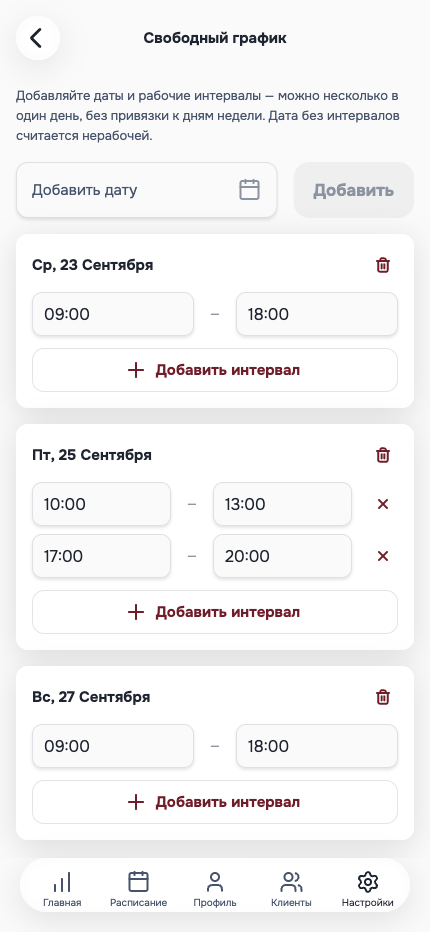
In “Free schedule” mode, the schedule is built not from a day of the week but from a date: you add a date and set one or several working intervals for it, as in the screenshot above. A date without intervals is considered a day off — there’s no need to mark “not working” separately, and there’s simply nowhere to mess up a formula in a spreadsheet, because there’s no spreadsheet. Switching between the regular and free schedule doesn’t erase the other mode’s data — it just isn’t used until it’s needed again.
Several workplaces — also without spreadsheets
One pro can have up to 20 workplaces (for example, if they see clients at two studios on different days), and each has its own schedule mode independent of the others: one place can work on a regular weekly template, and another on a free one. Between one client’s booking and the next, Talenza keeps the buffer set in the settings by itself — you don’t have to leave an “empty row” between visits by hand, as people often do in a spreadsheet so that clients don’t overlap.
Frequently asked questions
How do you keep a schedule without a CRM or Excel? With a calendar where working hours are set for specific dates rather than a weekly template. In Talenza this is the “Free schedule” mode: you mark the dates you take clients, with any number of intervals for each, without third-party spreadsheets.
What if the weeks aren’t alike at all? A regular “Mon–Fri, 9 to 6” schedule doesn’t fit here — a free schedule is turned on instead: not a template for the week ahead, but specific dates with their own hours for each.
Can you keep a schedule for several workplaces? Yes, one pro can have up to 20 workplaces, and each has its own schedule mode: regular or free, independently of each other.