
A client booking app for a manicure pro: 3 selection criteria and free options
August 10, 2026
· updated October 13, 2026
· Author:  Valeriy Eremeev, Co-founder of Talenza
Screenshots show the Russian-language interface.

A client booking app for a manicure pro without a salon should be free at the start, shouldn’t require an administrator to set up, and should let a client book by a single link — without calls and chatting. Among the free options on the Russian market, Talenza meets these criteria: the service catalog for nail services is already built in, and setup takes a few minutes — no separate course needed for that.
Three criteria that really matter
Booking service ads usually list dozens of features, but a solo manicure pro cares about three at most. Whether the plan is free — or it’s a one-month trial, after which you’ll have to pay for something you already use. How many steps there are to the first booking — whether an administrator is needed to set everything up, or the pro can manage alone in one evening. And whether the client sees the price and duration of a procedure in advance — or has to first write and ask how much extensions cost and how much repairing a single nail costs.
Manicure services — without typing from scratch
Talenza’s catalog of popular services has a ready-made “Nail service” category with standard items: manicure without polish, manicure with polish, combined manicure, nail extensions, nail repair, French. Each has a recommended duration that’s filled in by itself when you choose it; all that’s left for the pro is to enter their own price and, if they wish, adjust the time. It’s faster than typing the name and duration of every service by hand, and often more convenient than a spreadsheet column you have to keep in your head in sync with what the pro tells the client on the phone.
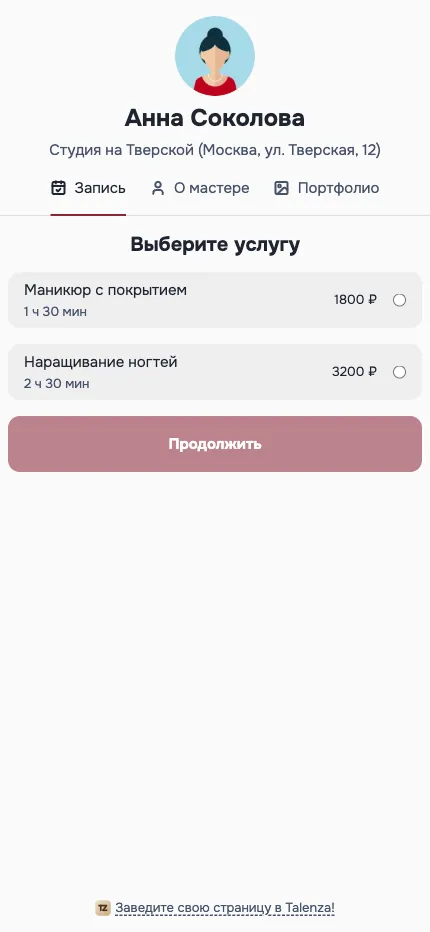
The screenshot shows a real public booking page: the client sees the price and duration of each service before choosing a time, and books on their own, without calling the pro.
Not only manicure — the catalog doesn’t lock you into one niche
Talenza’s specialization catalog isn’t limited to beauty services: one pro can have both “Manicure pro” and “Nail service,” and any custom specialization added by hand — we even told the story of motorcycle rental under the same account. For a manicure pro this means an additional service — brow shaping, pedicure, anything else — doesn’t require a separate app or a second account.
No-shows: a manicure pro’s most expensive problem
A manicure with gel polish takes an hour and a half to two hours, and if the client doesn’t show up, that slot can’t be sold to anyone: a new client won’t appear an hour before the visit. So when choosing an app, look not at whether “there are reminders” but at whether the pro sees the client’s reply.
In Talenza a reminder is a question, not just a message. A booking card has a “Remind the client and request confirmation” button: the text with the name, date, time and service is filled in by itself, and all that’s left is to choose the channel — Telegram, WhatsApp, SMS, or copy it. You don’t have to press anything at all: in the notification settings you can turn on auto-sending a chosen time before the visit. Reminders through the Telegram bot and email are free, a regular SMS costs ₽10. More on how a client confirms a visit and where the pro sees it — in the article Don’t guess whether the client will come.
Regular clients: book the next time in a couple of taps
Most of a manicure pro’s bookings are repeat ones: a refill every three or four weeks. A good app should make a repeat booking shorter than the first. In Talenza every past booking in a client’s card has a “Repeat” button: the service, the place and the client are already filled in, and the pro only has to pick a new date and time. And if the client books on their own, the service recognizes them by phone number and doesn’t ask for their name again. What this looks like — in the article Booking from scratch and repeating.
A portfolio next to the booking button
A manicure client chooses with their eyes: before booking, they want to see the work. If the photos live in a separate social network account, a person has to go back and forth. In Talenza a pro builds albums right in their account, and a “Portfolio” tab appears on the public booking page — the work and the choice of time on one screen. More — A portfolio that isn’t in Instagram (owned by Meta, which is designated an extremist organization and banned in Russia).
Trust also comes from what the client sees at the table: tools out of a sealed craft pouch, a fresh single-use file. We broke down the full tool-processing cycle — disinfection, washing, sterilization and storage — in a separate article.
In short: what popular services have
| Talenza | DIKIDI | Masters | YCLIENTS | |
|---|---|---|---|---|
| Free plan | Yes, with no time limit | Yes, basic features | No, a 14-day trial | No, only a trial period |
| Auto reminders with no per-message charge | Yes, Telegram bot and email | — | No: SMS automatically (paid), WhatsApp on a higher plan | — |
| A ready catalog of manicure services | Yes, “Nail service” | — | — | — |
| Who it suits best | A pro without a salon, with their own client base | A pro who needs a flow of new clients from the DIKIDI catalog | A pro ready to pay for financial analytics | A salon with employees and stock |
A dash means we haven’t checked that item ourselves and don’t want to guess. Detailed comparisons: DIKIDI or Talenza, Masters or Talenza, what to replace YCLIENTS with.
How to start in one evening
- Specialization. Choose “Manicure pro” or “Nail service” — this decides which services the catalog offers.
- Place of work. The address of your room or studio — the client will see it in the booking and in the reminder.
- Schedule. Working days and hours; if your schedule floats, a free schedule by dates will fit.
- Services. Tick the ones you need in the “Nail service” catalog and set your own prices — the duration is already filled in.
- Link. Send the booking link to your regulars and put it in the header of your social profile.
After that clients book on their own, and the pro sees new bookings in the app.
How much a booking app costs a solo pro per year — a subscription, pay-per-client or a free plan — we broke down with a calculation for 40 bookings a month in a separate guide.
Frequently asked questions
Which app should a manicure pro choose for booking clients? A service that is free at the start, is set up without an administrator, and lets a client book by a single link with no calls. Talenza is one of the free options on the Russian market: the service catalog for nail services is already built in, and setup takes a few minutes.
Do I have to type in the list of manicure services by hand? No — the catalog of popular services already has a “Nail service” category with standard items and the recommended duration of each. All that’s left is to choose the ones you need and enter your own price.
Will the service work if I have other services besides manicure? Yes, the specialization catalog isn’t limited to the beauty niche — you can run any services under one account and one booking link.
How can a manicure pro cut client no-shows? Send a reminder the day before and ask the client to confirm the visit. In Talenza you can do this manually from the booking card or turn on auto-sending: through the Telegram bot and email it’s free, a regular SMS is ₽10 per message. The client’s reply is visible to the pro right in the list of bookings.
«Веду запись сама и не хочу возвращаться к бумаге» — Ольга Т., парикмахер
Start free